Understanding how workflows execute in SteelEngine is key to building efficient and reliable automations. The execution engine automatically handles dependencies, concurrency, and data flow to ensure your workflows run smoothly and predictably.
How Workflows Execute
SteelEngine's execution engine processes workflows intelligently by analyzing dependencies and running blocks in the most efficient order possible.
Concurrent Execution by Default
Multiple blocks run concurrently when they don't depend on each other. This parallel execution dramatically improves performance without requiring manual configuration.
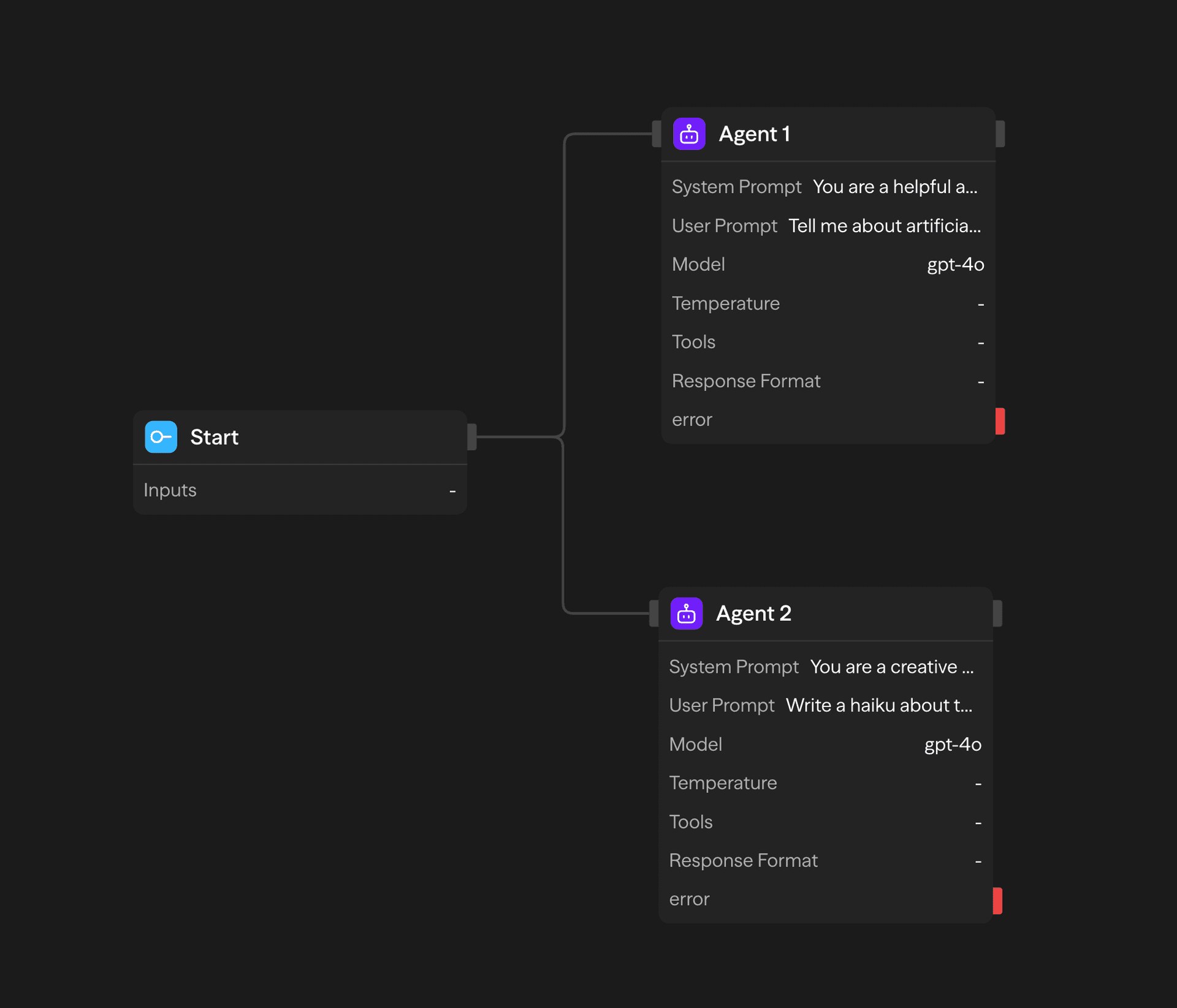
In this example, both the Customer Support and Deep Researcher agent blocks execute simultaneously after the Start block, maximizing efficiency.
The engine identifies layers of blocks with no dependencies on each other and runs each layer concurrently. That is the default for the main canvas, not something you configure per edge.
Subflow limits (Loop and Parallel)
Inside Loop and Parallel subflows, concurrency and nesting are capped so runs stay bounded:
| Limit | Default | Meaning |
|---|---|---|
| Parallel branches | 20 | Max concurrent branches inside a Parallel block (configurable via engine defaults) |
| Loop iterations | 1,000 | Cap for fixed-count and ForEach loops (and Do-While when it falls back to a fixed count) |
| Nested subflow depth | 10 | Max nesting of loops inside parallels (or vice versa) |
The Parallel Window block processes up to 1,000 items with 1-20 active at a time. Choose Collection for input items, Count for a fixed number of runs, or Branches for different named chains that each run once. A count of zero or an empty collection skips the body and returns empty results.
A Parallel Window can contain sequential Loop blocks, including loops within loops, and Workflow calls. Each active item retains its slot until its loops, child calls, and subsequent blocks finish, so other items can advance without waiting for it. Loop conditions in the window body resolve window references against that item's inputs and earlier outputs. Windows must stay at the top level and cannot contain Parallel or Parallel Window blocks directly. An unhandled item failure follows the window's error policy: stop the run, or reject the item and skip its remaining work. See loops inside a window.
Child workflows keep their own variables, Response, loops, and ordinary Parallel blocks. Map item data into the Workflow call's inputs and connect per-child follow-up blocks inside the window. A fast child can complete and report while a slower child is still running; blocks after the window wait for the ordered aggregate. Wait, Human in the Loop, document generation, and nested Parallel Windows are rejected in called children before their business work starts. See child workflows inside a window.
While / Do-While loops that re-evaluate a condition each iteration are not hard-capped the same way as fixed counts—ensure conditions eventually become false. Nested subflows (a loop inside a parallel, or a parallel inside a loop) are supported up to the depth limit above.
Automatic Output Combination
When blocks have multiple dependencies, the execution engine automatically waits for all dependencies to complete, then provides their combined outputs to the next block. No manual combining required.
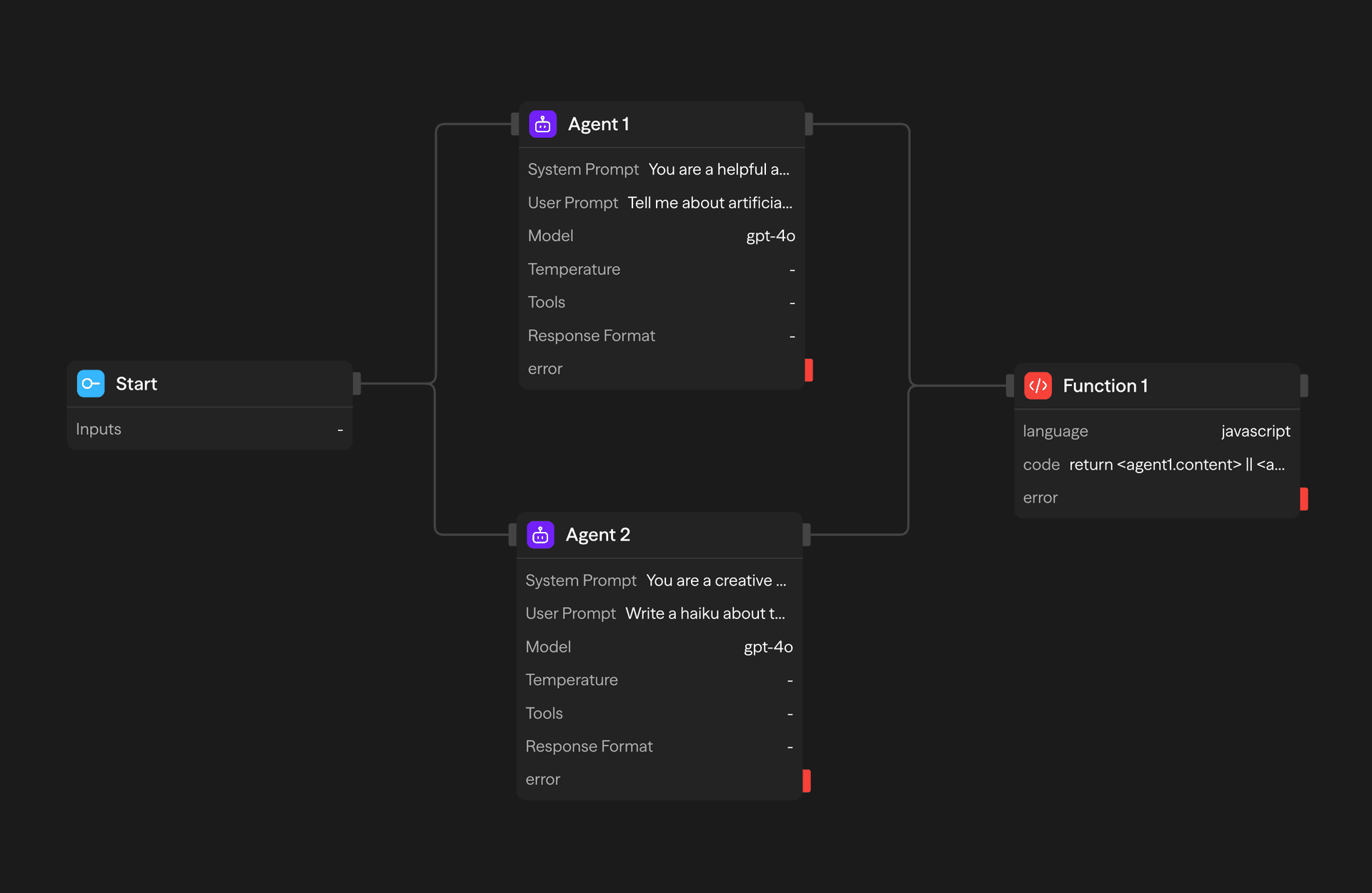
The Function block receives outputs from both agent blocks as soon as they complete, allowing you to process the combined results.
Smart Routing
Workflows can branch in multiple directions using routing blocks. The execution engine supports both deterministic routing (with Condition blocks) and AI-powered routing (with Router blocks).
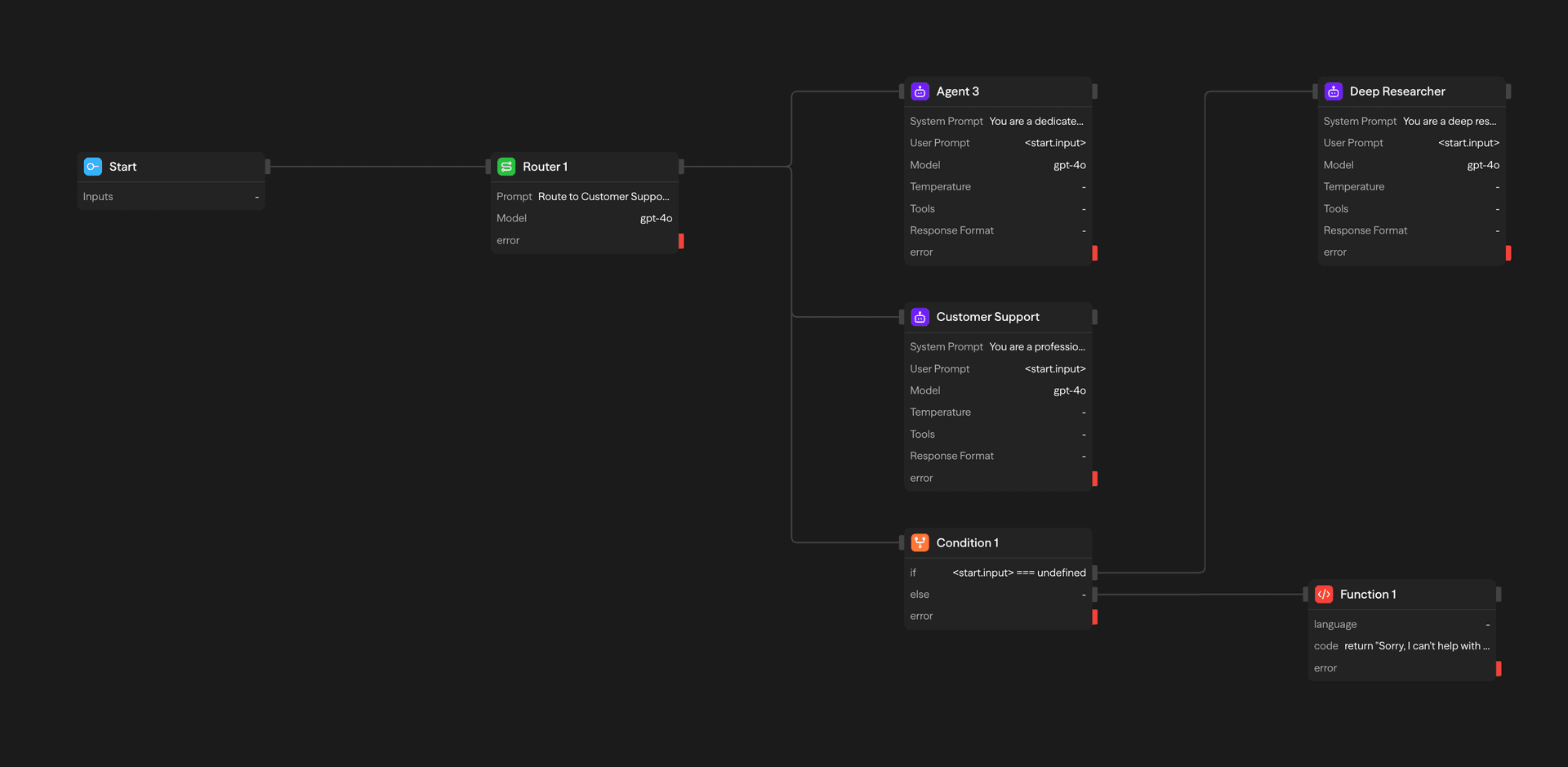
This workflow demonstrates how execution can follow different paths based on conditions or AI decisions, with each path executing independently.
Block Types
SteelEngine provides different types of blocks that serve specific purposes in your workflows:
Triggers
Start blocks initiate workflows and Webhook blocks respond to external events. Every workflow needs a trigger to begin execution.
Processing Blocks
Agent blocks interact with AI models, Function blocks run custom code, and API blocks connect to external services. These blocks transform and process your data.
Control Flow
Router blocks use AI to choose paths, Condition blocks branch based on logic, and Loop/Parallel blocks handle iterations and concurrency.
Output & Response
Response blocks format final outputs for APIs and chat interfaces, returning structured results from your workflows.
All blocks execute automatically based on their dependencies - you don't need to manually manage execution order or timing.
Execution Monitoring
When workflows run, SteelEngine provides real-time visibility into the execution process:
- Live Block States: See which blocks are currently executing, completed, or failed
- Execution Logs: Detailed logs appear in real-time showing inputs, outputs, and any errors
- Performance Metrics: Track execution time and costs for each block
- Path Visualization: Understand which execution paths were taken through your workflow
All execution details are captured and available for review even after workflows complete, helping with debugging and optimization.
Key Execution Principles
Understanding these core principles will help you build better workflows:
- Dependency-Based Execution: Blocks only run when all their dependencies have completed
- Automatic Parallelization: The engine builds layers of independent blocks and runs them concurrently without configuration
- Bounded subflows: Parallel branches default to 20, fixed loop iterations to 1,000, nested Loop/Parallel depth to 10
- Smart Data Flow: Outputs flow automatically to connected blocks
- Error Handling: Failed blocks stop their execution path but don't affect independent paths
- Response Blocks as Exit Points: When a Response block executes, the entire workflow stops and the API response is sent immediately. Multiple Response blocks can exist on different branches — the first one to execute wins
- State Persistence: All block outputs and execution details are preserved for debugging
- Cycle Protection: Workflows that call other workflows (via Workflow blocks, MCP tools, or API blocks) are tracked with a call chain. If the chain exceeds 25 hops, execution is stopped to prevent infinite loops
Recovery After Worker Interruption
New executions retain the reviewed recovery policy with their prepared workflow. Slack → Get User Presence can retry automatically after worker loss, using the same workflow version and saved inputs. Completed steps use their persisted results. A repeated read may return newer provider data.
Only explicitly reviewed read operations receive this behavior. An HTTP GET method or a tool name does not enable it. Older prepared executions retain their original policy. Writes and other integrations can stop with an uncertain outcome that needs operator review; check the provider before starting a fresh execution. See Release Operations and Acceptance for recovery limits.
Next Steps
Now that you understand execution basics, explore:
- Block Types - Learn about specific block capabilities
- Logging - Monitor workflow executions and debug issues
- Cost Calculation - Understand and optimize workflow costs
- Triggers - Set up different ways to run your workflows