The Start block is the default trigger for workflows built in SteelEngine. It collects structured inputs and fans out to the rest of your graph for editor tests, API deployments, and chat experiences.
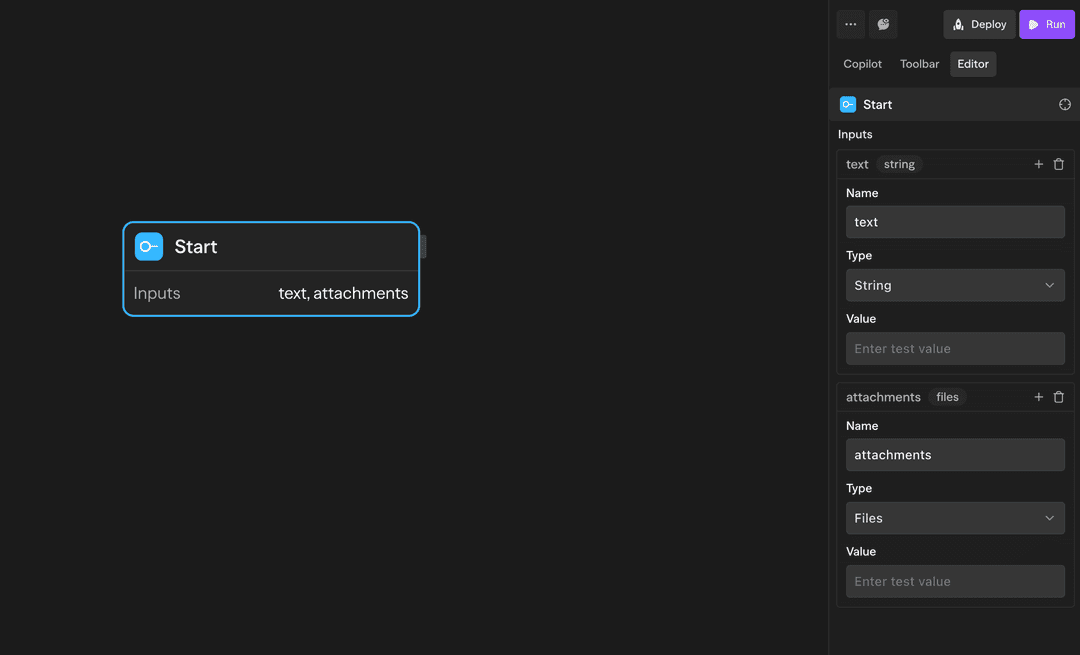
The Start block sits in the start slot when you create a workflow. Keep it there when you want the same entry point to serve editor runs, deploy-to-API requests, and chat sessions. Swap it with Webhook or Schedule triggers when you only need event-driven execution.
Fields exposed by Start
The Start block emits different data depending on the execution surface:
- Input Format fields — Every field you add becomes available as
<start.fieldName>. For example, acustomerIdfield shows up as<start.customerId>in downstream blocks and templates. - Built-in fields — The Start block always exposes
<start.input>,<start.conversationId>, and<start.files>. Chat fills them with the latest user message, the active session id, and any attachments. API callers can supplyinput,conversationId, andfilesin the request body the same way. When a run does not supply them, they are unset.
Keep Input Format fields scoped to the names you expect to reference later—those values are the only structured fields shared across editor, API, and chat runs.
Configure the Input Format
Use the Inputs sub-block on the Start block to define the schema that applies across execution modes. Each field has:
- Name — The key callers send and the name you reference downstream as
<start.fieldName>. - Type — String, Number, Boolean, Object, Array, or Docs. Docs fields use the
file[]type. They accept uploads from the editor form, chat, and API callers. - Required — On by default. If a required field has no value, the run fails at the Start block with
Start input "fieldName" is required.Turn it off for optional fields. - Description — Optional note about what the field is for.
- Value — The default value. It pre-fills the manual run form. It also applies on deployed runs when the caller leaves the field out. A default is enough to make a required field pass.
SteelEngine converts each value to the field type: numeric strings become numbers, "true"/"false" become booleans, and JSON strings become objects or arrays. If a value cannot be converted, the run fails with a message that names the field, for example Start input "amount" must be a valid number.
Reference structured values downstream with expressions such as <start.customerId> depending on the block you connect.
How it behaves per entry point
When you click Run in the editor, the Start block renders the Input Format as a form. Default values make it easy to retest without retyping data. Submitting the form triggers the workflow immediately and the values become available on <start.fieldName> (for example <start.sampleField>).
File fields in the form upload directly into the corresponding
<start.fieldName>; use those values to feed downstream
tools or storage steps.
Referencing Start data downstream
- Connect
<start.fieldName>directly into agents, tools, or functions that expect structured payloads. - Use templating syntax like
<start.sampleField>or<start.files[0].url>in prompt fields. - Keep
<start.conversationId>handy when you need to group outputs, update conversation history, or call back into the chat API.
Best practices
- Treat the Start block as the single entry point when you want to support both API and chat callers.
- Prefer named Input Format fields over parsing raw JSON in downstream nodes; type coercion happens automatically.
- Add validation or routing immediately after Start if certain fields are required for your workflow to succeed.